Overview
This document describes the implementation, processes, and automated workflow for FOLIO projects maintained in the folio-org GitHub repositories. The release procedures are separately summarised.
The build, test, release, and deployment processes are, in large part, orchestrated and automated by Github Actions workflows. Integration testing, performance testing, and reference environment builds are automated using a Jenkins server. A Nexus repository is used to host FOLIO Maven artifacts and NPM packages, and Docker Hub is used as the Docker registry for Docker images. AWS provides the infrastructure used to host Jenkins and Nexus, as well as permanent and on-demand resources for FOLIO integration and performance testing and reference environments.
Software build pipeline
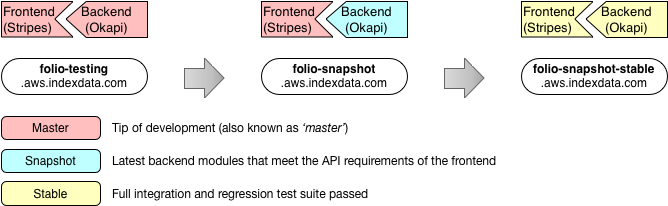
In order to fully understand this diagram, keep in mind that there are two parts to FOLIO – the frontend (“Stripes”), which is a single-page application running in the browser and the backend, which is a collection of microservices running in an environment like Kubernetes or Docker and served to the user through a set of applications collectively known as “Eureka.” Eureka provides an authentication and authorization layer, and proxies the microservices for the user.
In addition, there is another part that is not indicated in this diagram. These are various “edge” modules, which bridge the gap between some specific third-party services and FOLIO (e.g. RTAC, OAI-PMH), secured using API key authentication. The API key is explained at edge-common.
The project uses a suite of continuous integration – or CI – tools (described below) that build new versions of the software whenever a developer makes a change, as well as on a timed basis.
The CI system automatically generates deployment artifacts and builds reference environments that are used for various purposes by the developers, the product owners, and the testers.
For each module, Github Actions (GHA) workflows execute for commits to branches to ensure that the module’s own test suite passes. The GHA workflows also include third party checks for code quality and security. Commits to the module’s default branch (main or master) trigger the build of distribution artifacts (npm packages or Docker container images) and upload of these artifacts to Nexus or Docker Hub. Module releases (see release procedures also exercise the test suites and produce official release artifacts.
Reference environments
A number of reference environments are created by various CI processes for user acceptance testing and validation. These are detailed on the FOLIO Project Wiki.
The software versions of each module is shown via the system settings, e.g. https://folio-etesting-snapshot-diku.ci.folio.org/settings/about
The FTP CI test server is available to verify FTP operations for various applications, e.g. Acquisitions.
Nexus Repository Manager
FOLIO utilizes the Nexus OSS Repository Manager to host Maven artifacts and NPM packages for FOLIO projects.
The hosted FOLIO Maven repositories consist of two distinct repos - a snapshot and release repository. A ‘mvn deploy’ will automatically deploy artifacts to the proper repository depending on the project version specified in the POM. Only Jenkins has deployment permissions to these repositories. However, they are available “read-only” to the FOLIO development community. FOLIO Maven projects that depend on Maven artifacts from other FOLIO projects can retrieve the artifacts by specifying the following in the project’s POM:
  <repositories>
    <repository>
      <id>folio-nexus</id>
      <name>FOLIO Maven repository</name>
      <url>https://repository.folio.org/repository/maven-folio</url>
    </repository>
  </repositories>
The URL will search both the snapshot and release repositories for the artifact specified.
FOLIO projects which need to deploy artifacts to the FOLIO Maven repository during the Maven ‘deploy’ phase should have the following specified in the project’s top-level POM:
  <distributionManagement>
    <repository>
      <id>folio-nexus</id>
      <name>FOLIO Release Repository</name>
      <url>https://repository.folio.org/repository/maven-releases/</url>
      <uniqueVersion>false</uniqueVersion>
      <layout>default</layout>
    </repository>
    <snapshotRepository>
      <id>folio-nexus</id>
      <name>FOLIO Snapshot Repository</name>
      <uniqueVersion>true</uniqueVersion>
      <url>https://repository.folio.org/repository/maven-snapshots/</url>
      <layout>default</layout>
    </snapshotRepository>
  </distributionManagement>
Node.js-based FOLIO projects can either deploy or retrieve FOLIO NPM dependencies by adding the location of the FOLIO NPM repository to their NPM settings.
Typically, this can be set via one of the following NPM commands:
npm config set registry https://repository.folio.org/repository/npm-folio/
npm config set registry https://repository.folio.org/repository/npm-folioci/
Deployment to the FOLIO repositories requires the proper permission. Artifacts and packages should only be deployed to the FOLIO Maven and NPM repositories via a build job configured in Jenkins.
npm-folio is where the formal release artifacts of UI modules are published to.
These are used to build the official distributions of FOLIO e.g. 2020 Q3 - Honeysuckle.
These artifacts are produced by dedicated release builds.
npm-folioci is where the pre-release artifacts are published to. They are sometimes
referred to as “tip-of-master” because any time a PR is merged to the master branch of
a UI module, a new artifact is automatically published to npm-folioci.
These are used for building the hosted reference environments for testing purposes e.g.
https://folio-snapshot.dev.folio.org/ . These artifacts are produced by the
mainline (usually named master) builds for each module.
Most developers are working on pre-release versions of the software and so want to check it works with other pre-release versions of other libraries/modules rather than the last formally released version which could be a few months old.
Docker Hub
Docker images are the primary distribution model for FOLIO modules. All modules should include a Dockerfile that describes how to build a runtime Docker image for the module. If a Dockerfile is present, Jenkins will create a Docker image for the module and publish the image to a repository on Docker Hub as a post-build step if the previous build step is successful. That CI stage also deploys a Docker Hub README generated from the LaunchDescriptor.
Docker images are published to the ‘folioci’ namespace on Docker Hub. This namespace is primarily used by Jenkins for other continuous integration jobs but is also open to the FOLIO development community for testing and development purposes. “Snapshot” versions of modules are published after every successful Jenkins build. To pull an image from the ‘folioci’ namespace, prefix the module name with ‘folioci’.
For example:
docker pull folioci/mod-circulation:latest
Images are currently tagged with the current version of the module as well as with ‘latest’ which designates the most recent version. Alternative tagging methods may include the Jenkins build number, git commit ID, or git tag. Similar to the Maven repositories, write access to the ‘folioci’ repositories is via Jenkins only.
A separate set of repositories on Docker Hub are designated for “released” versions of modules: the ‘folioorg’ namespace.
Docker Hub repository permissions are very similar to GitHub’s repository permissions. It is possible to invite Docker Hub users to collaborate on repositories within the namespace on a per repository basis.